A homeschool transcript tool that lives on your device.
Make a professional high school transcript in your browser. Pay $15 once. Nothing leaves your computer.
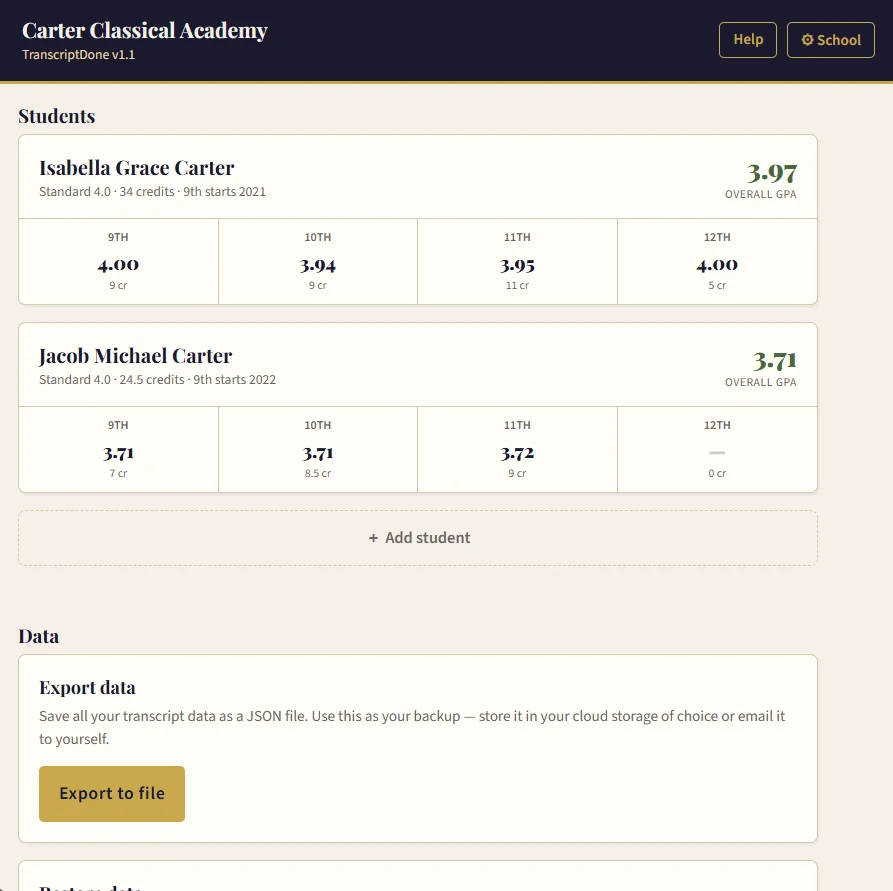
Make a professional high school transcript in your browser. Pay $15 once. Nothing leaves your computer.
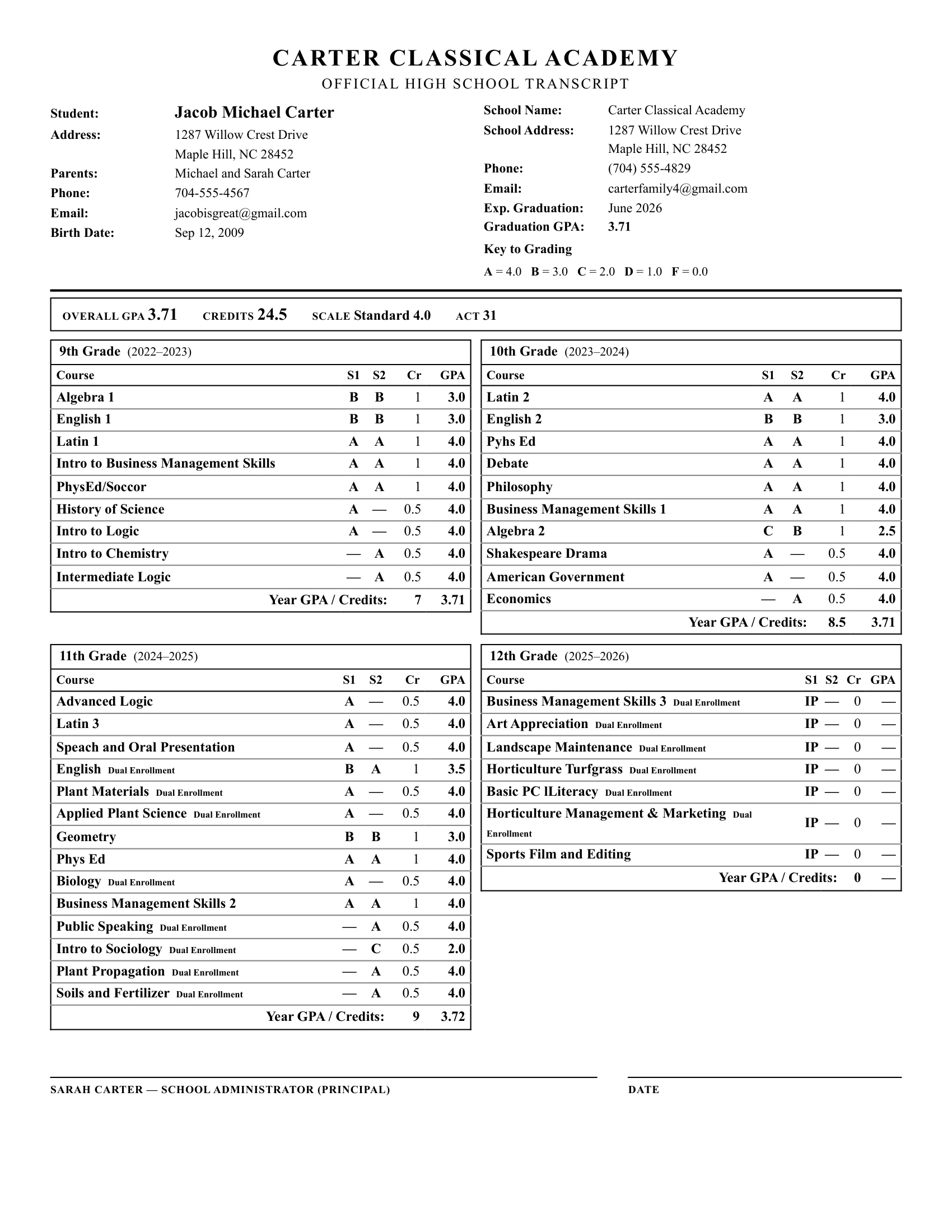
Clean typography, classic layout, signature block, certification statement. This is what the admissions offices, dual enrollment programs, and scholarship applications expect.
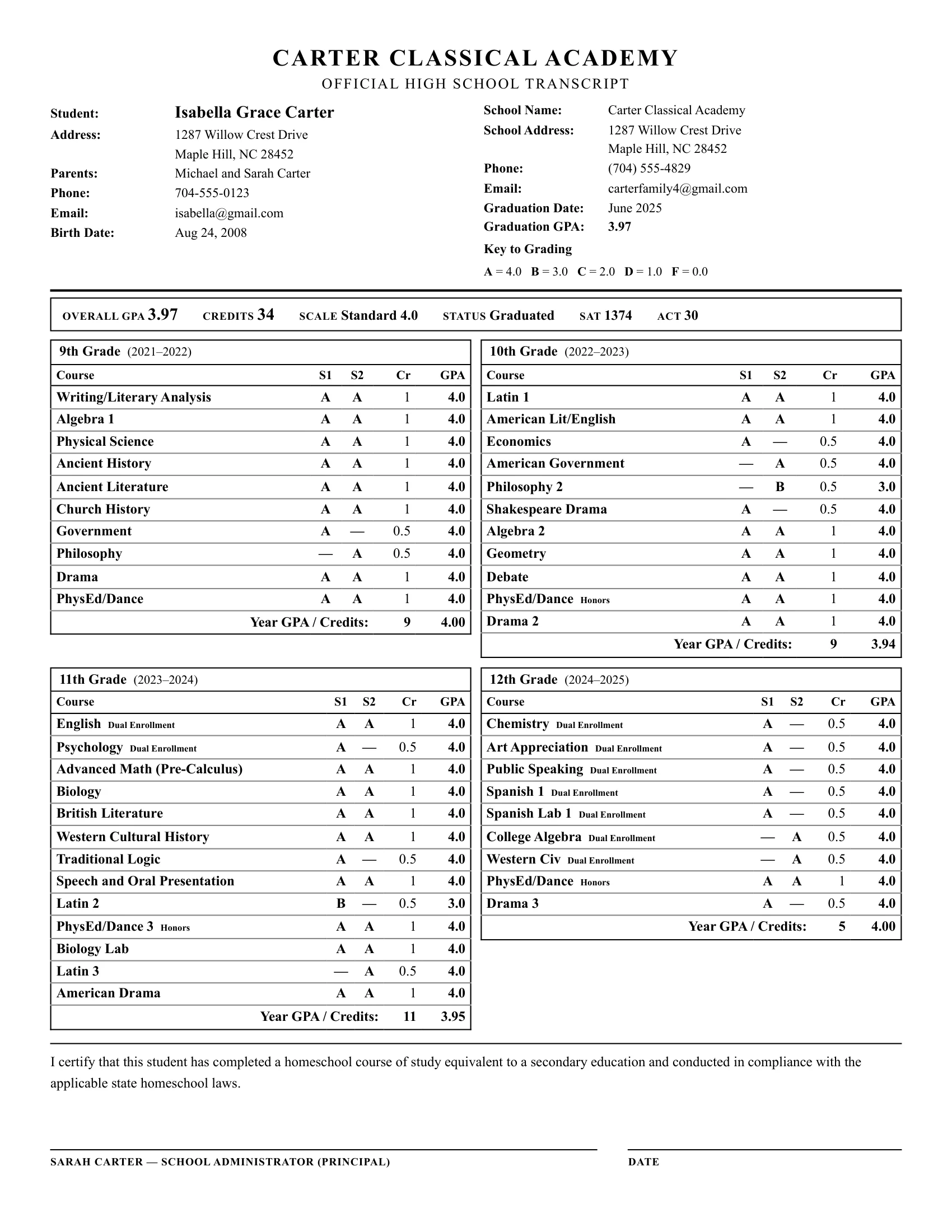
↑ Detail from the graduated transcript above — certification block

The statement and signature line appear automatically when a student is marked as graduated.
↑ Detail from the in-progress transcript above — 12th grade IP column
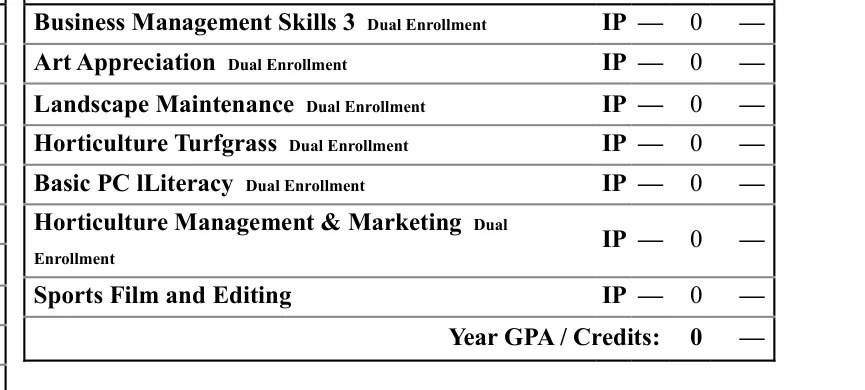
Courses still in progress show as IP — they don't affect GPA or credits until you give them a real grade.
For something as personal as your child's school records, where it's kept matters.
The TranscriptDone tool keeps everything you enter — school info, courses, grades, GPA, the whole transcript — right on your computer or phone, in your browser. Nothing is uploaded. Nothing is synced to a server. We don't have it, and we couldn't share it with anyone if we tried.
One honest caveat: when you first activate the app, it makes a single check against your license key to confirm your purchase. That's the only time it touches the internet. After that, it's just you and the file.
You pay $15 once. The app is yours. Use it for one student or twenty, this year and ten years from now. No monthly fee. No annual renewal. No "we noticed you haven't logged in" emails.
TranscriptDone is a single HTML file you download. Put it on your laptop, your Dropbox, a USB stick — wherever you like. As long as you have a browser, it still works.
A one-click Export saves your data as a small JSON file. Drop it in your email to yourself or your cloud storage. If anything ever happens to your computer, Import puts everything back exactly the way it was. Your transcripts aren't trapped anywhere.
I'm a homeschool dad who graduated six children with my wife.
When my oldest hit high school, I searched for a transcript tool that worked the way I wanted — and couldn't find one. So I built my own spreadsheet. It auto-calculated GPA and produced a transcript that looked the part.
But it was complex. Every time I added courses, the formatting broke and I had to fix the spacing. With five of my six children in dual enrollment from junior year forward, I was doing that every semester — not just at graduation.
After my last child graduated, I rebuilt the whole thing as TranscriptDone so other homeschool parents wouldn't have to deal with the same hassle. It's the same clean layout I used for my own students — just rebuilt to work without the formatting headaches.
— Scott
9th through 12th grade, semester-by-semester. Add courses as your student takes them, or fill it out at graduation — both work.
Standard 4.0, Plus/Minus 4.0, 5.0 scale, and Pass/Fail.
Mark each course as Standard, Honors, AP, or Dual Enrollment. The transcript distinguishes them clearly for admissions readers.
Use the IP grade for classes still underway. Doesn't count toward GPA or credits until you give it a real grade. Perfect for when submitting the transcript for dual enrollment.
Add scores directly to the transcript so they're visible alongside coursework.
The app shows you the typical graduation credit requirement for each state, so you can check your transcript against your state's rules.
When you mark a student as graduated, the app adds the certification language admissions offices look for.
One file, every student in your family. No re-entering school info for each child, no juggling separate files.
Prints cleanly on standard 8.5×11 paper from any browser. No exotic fonts to install, no PDF gymnastics.
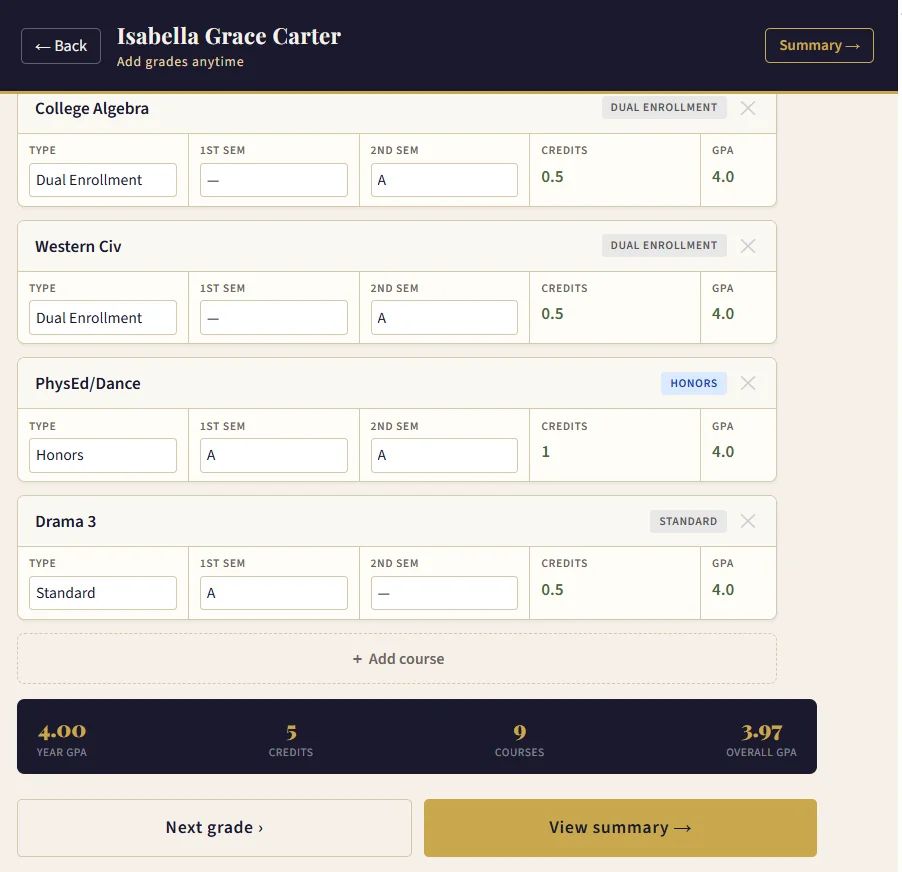
Course entry with auto-calculated GPA, credits, and totals — no formulas to wrangle.
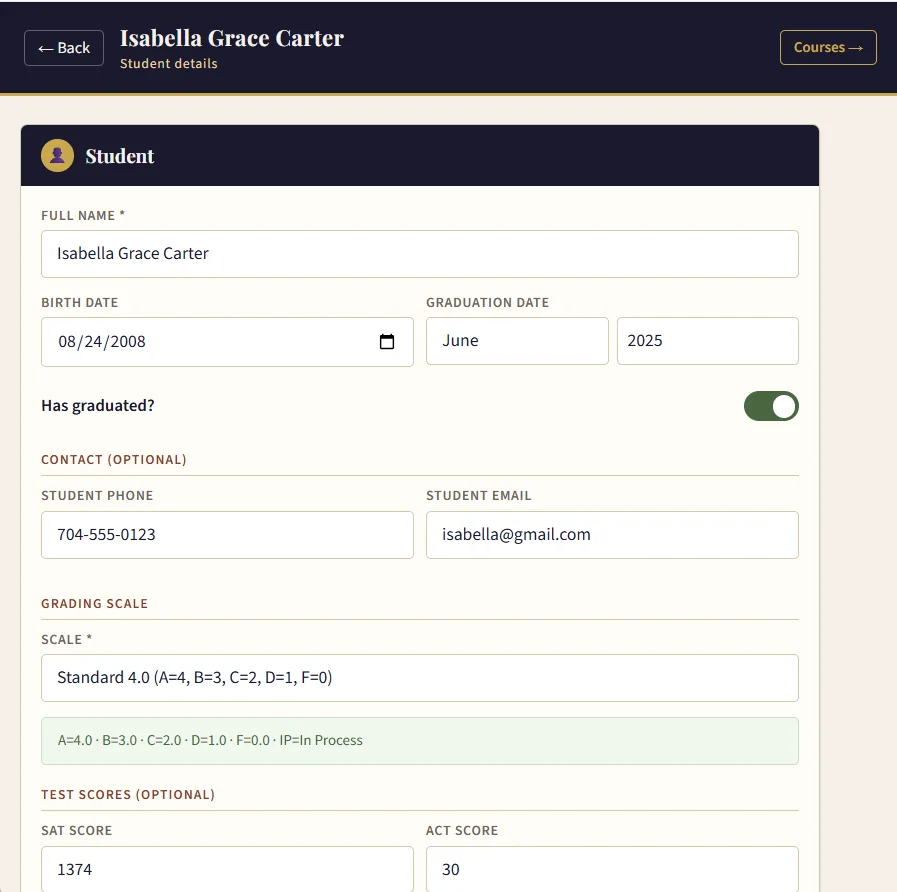
One screen for student details, grading scale, and test scores.
Any updates I make to TranscriptDone — additional transcript formats, more grading options, things homeschool parents ask for — are covered by your $15. No upgrade fees, no premium tier.
If you have a weekend to set up formulas in Excel, troubleshoot cell references in Google Sheets, format print margins in a PDF template, and re-Google how to calculate GPA every year… a free template might work.
That's how I started too. Then I got tired of reformatting it every semester. For $15, it's done.
The honest spectrum:
Want the full picture? We put together a detailed comparison of the most popular homeschool transcript tools — free, paid, templates, and subscriptions. See the full comparison →
Yes. Homeschool parents act as the school administrator in most states, and admissions offices regularly accept parent-issued transcripts. TranscriptDone produces the professional format they expect — clean typography, signature block, and certification statement.
No. One payment, yours forever. Future updates are included at no extra charge.
Yes. One purchase covers your whole family. Unlimited students on a single license.
It works on Android and any desktop or laptop browser (Windows, Mac, Linux). It does not work on iPhone or iPad — because the app runs as a local file on your device, iOS Safari cannot open it properly.
If you can send an email, you can use this. Downloading and opening the file is the hardest part. I'm one reply away if you get stuck.
It stays in your browser, on your device. Nothing is uploaded to a server. The only time the app touches the internet is a one-time check of your license key when you first activate it. Nothing is tracked. You can use the Export feature any time to save a backup file you control.
Only the first time, when the app verifies your license key. After that, it works fully offline. You can use it on a plane, at a cabin, or with the wifi unplugged.
If you've saved a backup file somewhere off your computer — cloud storage, email, a thumb drive — reverify your license key, click Import, and you're back to where you were.
The one scenario to plan for is losing your computer without ever having saved a backup. In that case, your data has to be re-entered. That's why Export is there. It takes about three seconds; do it at the end of each semester and you're covered.
When a new version is available, Gumroad sends you an email at the address you used at checkout. Sign in to your Gumroad library to download the new HTML file — or use the download link from your original receipt email. Same license key, no extra charge.
Have a question that's not here? Send me an email — I'm the one who reads them. — Scott
What an early user said
"What a great tool for Homeschooling families."— Anonymous
Hit the button below. You'll get the file and your license key instantly. Open it on your Windows, Mac, Linux, or Android device. Enter your school info once. Add your students. Print.
Get the app — $15That's it. Transcript done.